

Your Facebook Page Is Scheduled to Be Permanently Deleted—Don’t Fall for This Phishing Scam
As a small business owner, you likely rely on Facebook to connect with customers and build your brand. It is also a key platform for promoting your services. But what happens when your Facebook page is suddenly at risk of being deleted, and you receive a frantic message about it? Unfortunately, this scenario is becoming all too common, as scammers are targeting business owners with increasingly convincing Facebook phishing scams.
In this blog post, we’ll walk you through one of the most recent Facebook phishing scams. We’ll explain how to identify it and share steps to protect your business page from harmful attacks. As your trusted guide in online security, Attractional Marketing is here to help you safeguard your business’s digital presence.
The Growing Threat of Facebook Scams
Phishing scams have been a growing concern for businesses of all sizes. These scams use social engineering tactics to manipulate victims into sharing sensitive information, such as login credentials and personal details. One of our clients recently received an alarming message claiming Facebook would permanently delete their page for violating trademark rights. This is a prime example of the type of Facebook phishing scam that can damage your online presence and compromise your business’s sensitive information.
The Scam You Need to Watch Out For to Protect Your Facebook Page
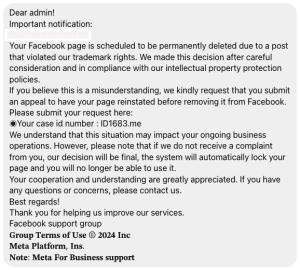
The scam message often looks like this:
Dear admin!
Important notification:
Your Facebook page is scheduled to be permanently deleted due to a post that violated our trademark rights. We made this decision after careful consideration and in compliance with our intellectual property protection policies.
If you believe this is a misunderstanding, we kindly request that you submit an appeal to have your page reinstated before removing it from Facebook.
Please submit your request here: [fake link]
Your case id number: ID1683.me
We understand that this situation may impact your ongoing business operations. However, please note that if we do not receive a complaint from you, our decision will be final, and the system will automatically lock your page, preventing you from using it.
Your cooperation and understanding are greatly appreciated. If you have any questions or concerns, please contact us.
Best regards,
Facebook Support Group
At first glance, this message may seem like an official communication from Facebook. It’s designed to create a sense of urgency and fear, urging you to click on a fake link to “resolve” the issue. But this is a classic phishing scam designed to steal your account information and potentially lock you out of your Facebook page.
How This Scam Works: The Tactics Scammers Use
Phishing scams like these rely on several key tactics to manipulate victims into acting quickly without thinking:
- Urgency: The scam creates a false sense of urgency by claiming that your Facebook page is about to be deleted, urging you to take immediate action.
- Impersonation: Scammers pose as Facebook support by using familiar language, even including fake case numbers to make their message appear legitimate.
- Fake Links: The message includes a link that leads to a phishing website, not an official Facebook page. Clicking the link could prompt you to input your login credentials or other sensitive information, compromising your account.
By preying on your fear of losing your business page, scammers hope to convince you to take quick action without verifying the authenticity of the message.
The Consequences of Falling for This Scam

If you fall for this scam, the consequences can be severe. Here’s what could happen:
- Loss of Access: Scammers can take control of your Facebook page, changing the account credentials and locking you out entirely.
- Exposure of Sensitive Information: If you provide your login credentials to the phishing website, scammers may gain access to sensitive business data. This includes payment information, customer details, and more.
- Damage to Brand Reputation: If scammers hijack your page, they could post inappropriate content or send harmful messages to your followers, damaging your brand’s reputation and customer trust.
How to Spot a Facebook Phishing Scam
It’s crucial to recognize the signs of a phishing scam to protect your business. Here are some red flags to look out for:
- Suspicious Links: Hover your mouse over any links in the message. If the URL looks strange or doesn’t come from an official Facebook domain (like facebook.com), it’s likely a scam.
- Generic Greetings: Legitimate messages from Facebook will address you by your business name or Facebook username. A generic greeting like “Dear admin” is a red flag.
- Grammar and Spelling Errors: Official messages from Facebook are professional and free of typos. If you spot any spelling or grammar mistakes, the message is likely a scam.
- Urgency and Threats: Scammers often use urgency (e.g., “your page will be deleted soon”) to pressure you into acting quickly without thinking things through.
Steps to Protect Your Facebook Page
Now that you know how to spot a phishing scam, here are some steps you can take to safeguard your Facebook business page:
- Verify the Message and Sender’s Identity: Always verify the sender’s identity before clicking on any links. Make sure the message comes from a trusted source. If you receive a suspicious message, log into your Facebook account directly (by typing facebook.com into your browser) and check for any official notifications or warnings.
 Verify the Message and Sender’s Identity: Always verify the sender’s identity before clicking on any links. Make sure the message comes from a trusted source.
- Enable Two-Factor Authentication: Two-factor authentication (2FA) adds an extra layer of security to your Facebook account. By requiring both your password and a verification code sent to your phone, it makes it much harder for scammers to gain unauthorized access.
- Regularly Monitor Your Account Activity: Keep a close eye on your Facebook business page for any unusual activity, such as unauthorized posts or changes to your account details. If you notice something suspicious, take immediate action.
- Educate Your Team: Ensure that everyone with access to your business’s Facebook page understands the risks of phishing scams and knows how to identify them. Hold regular training sessions to keep your team informed.
- Use Facebook’s Official Resources: Facebook provides official resources to help protect your account. Visit their Security Help Center for tips on securing your business page.
Stay Safe Online with Attractional Marketing
In today’s digital age, online security is more important than ever. By staying informed and taking proactive steps to protect your Facebook page, you can avoid falling victim to phishing scams and keep your business’s online presence secure.
At Attractional Marketing, we specialize in helping small and medium-sized businesses navigate the complexities of digital marketing and online security. If you’re concerned about the security of your Facebook page or need help managing your social media presence, don’t hesitate to reach out to us. Our team of experts is here to guide you through securing your accounts and keeping your digital presence safe.
Take Action Now Share this article with fellow business owners to help them stay safe from phishing scams. If you’re unsure about the security of your Facebook page, contact Attractional Marketing today for support. We’re here to help you protect your business and your brand.